LM hash, NT hash, NTLMv1/v2
Introducting the differences between LM hash, NT hash, NTLMv1/v2, the encryption method used by Windows authentication
LM hash
LM hash is a old password encryption method used on windows until windows XP/windows server 2003. It is disabled by default since windows vista/windows server 2008 due to the algorithm are easy to crack.
How LM Hash generated?
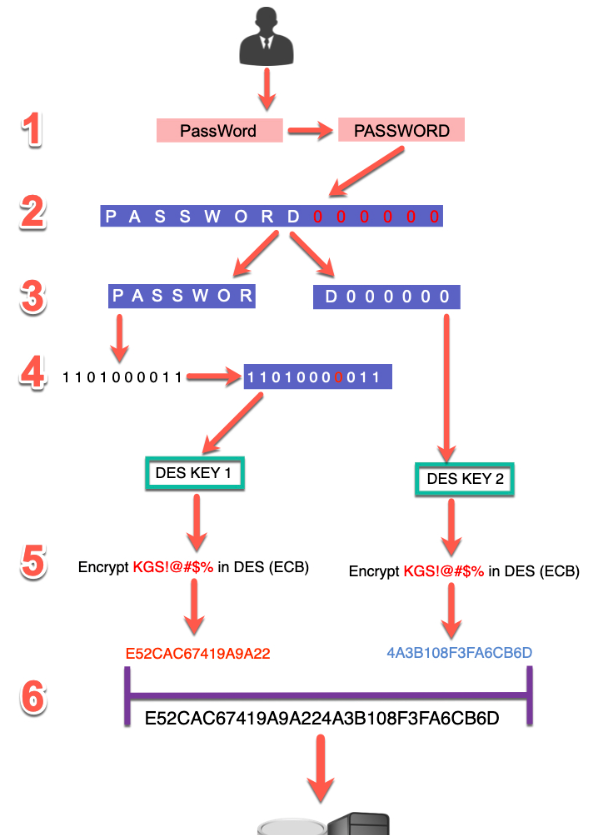
Let’s assume that the user’s password is PassWord
All characters will be converted to upper case
PassWord -> PASSWORD
In case the password’s length is less than 14 characters it will be padded with null characters, so its length becomes 14, so the result will be:
PASSWORD000000
- These 14 characters will be split into 2 halves
- PASSWOR
- D000000
Each half is converted to bits, and after every 7 bits, a parity bit (0) will be added.
PASSWOR → 01010000010000010101001101010011010101110100111101010010 → 0101000000100000010101000110101000110100101110100011110010100100
As a result, we will get two 64-bit value from the 2 halves after adding these parity bits. These will be used as DES encryption key in the next step.
Each of these keys is then used to encrypt the string “KGS!@#$%” using DES algorithm in ECB mode so that the result would be
PASSWOR = E52CAC67419A9A22
D000000 = 4A3B108F3FA6CB6D
The output of the two halves is then combined, and that makes out LM hash
E52CAC67419A9A224A3B108F3FA6CB6D
Why it deprecated ?
As you can see how LM hash generated, it convert all character to uppercase in first step. For example, the hashes of the following password will generate same hash value:
- Password1
- pAssword1
- PASSWORD1
- PassWord1
Generated hash of above: E52CAC67419A9A224A3B108F3FA6CB6D
Moreover, if the password is 7 characters or less, the 2nd half will always be AAD3B435B51404EE. This hash also known as Blank Hash. The value of the hash is just 7 null value (or 7 zero value).
NTLM hash (a.k.a NT Hash)
NT Hash is latest version of LM hash and currently password encryption method used on windows system. Bear in mind that NET-NTLM is NOT SAME as NTLM hash, NET-NTML is a authentication protocol for windows system and will talk about it later.
The storing location of NTLM hash are depending on different windows system environment.
- For local or normal Windows environment: SAM
- You need to obtain 2 file in order to obtain the data NTLM hash store in SAM
- C:\Windows\System32\config\SYSTEM
- C:\Windows\System32\config\SAM
- You need to obtain 2 file in order to obtain the data NTLM hash store in SAM
- For AD environment: NTDS
- You need admin access over the domain controller to obtain it
How NTLM hash generate?
Encrypt a plain text password isn’t complicated, it use MD4 hashing algorithm
- The password is converted to Unicode
Use MD4 convert it to the NTLM
For example: MD4(UTF-16-LE(password))
Since there are no salts used while generating the hash, cracking NTLM hash can be done either by using pre-generated rainbow tables or using hashcat.
NTHash and LM hash on windows
If you tried to extract these hash from windows system, you will found that the LM hash and NTHash are existing in the same time.

But the LM hash is actually Blank hash since LM hash is disabled by default nowadays.
NET-NTLM Authentication
NET-NTLM is a authentication / challenge-response protocol used for client/server authentication in order to avoid sending user’s hash over the network.
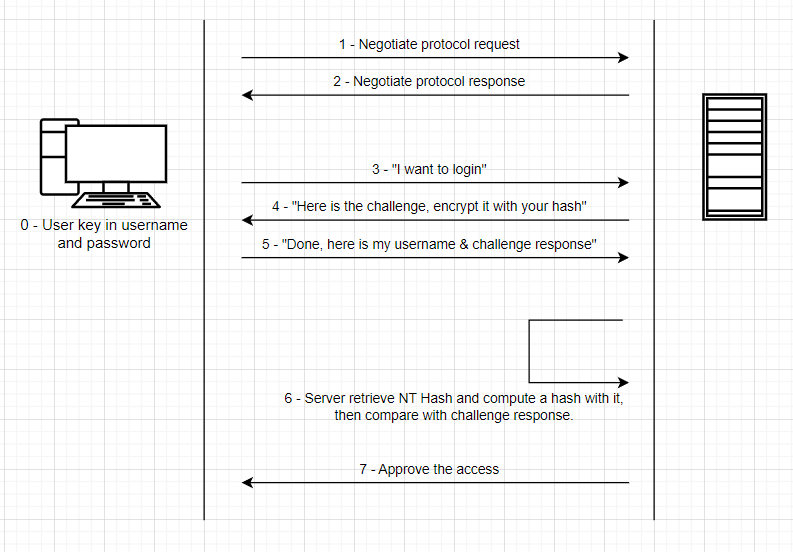
- The user enters his/her username and password, device will generate NTHash based on the password user had type.
- The client initiates a negotiation request with the server, that request includes any information about the client capabilities such as the protocols that the client supported.
- The server pick a protocol and let client know which protocol selected.
- The client request an authentication session to access the server.
- The server response with NTLM challenge, which actually is a random string of characters.
- The client encrypt the challenge string with NT Hash that generate on step 1 when user enter his/her password, and send back to server together with the username.
- The server will encrypt the NTLM challenge with the copy of NTHash that store on server or or pass the NTLM challenge to Domain Controller for verify.
- If the encrypted result generated on server same as client NTLM challenge response, it will authenticated the access.
NTHash vs NET-NTLM hash
These are 2 different hash that used for different purpose. NTHash are used user’s password to generate the hash and store in windows system. Which NET-NTLM hash are generated during challenge-response protocol for client and server authentication.
Example of NTHash:
(LM hash: NTHash) aad3b435b51404eeaad3b435b51404ee:e19ccf75ee54e06b06a5907af13cef42
Example of NET-NTLM hash:
(username::hostname:response:response:challenge)
admin::N46iSNekpT:08ca45b7d7ea58ee:88dcbe4446168966a153a0064958dac6:5c7830315c7830310000000000000b45c67103d07d7b95acd12ffa11230e0000000052920b85f78d013c31cdb3b92f5d765c783030
From a pentesting perspective:
- You CAN perform Pass-The-Hash attacks with NTLM hashes.
- You CANNOT perform Pass-The-Hash attacks with Net-NTLM hashes but you CAN perform relay attack that will grand you access to other device or service.
- You CAN crack both hashes if the password is weak
References
- Windows authentication attacks : LM, NT (aka NTLM) :
- Practical guide to NTLM Relaying in 2017
- NTLM - HackTricks
- Windows authentication attacks – part 1
- Confusion clearing of LM, NT, NTLM, NTLMv1/v2, Net-NTLMv1/v2
- Understanding NTLM Authentication and NTLM Relay Attacks
- Pwning with Responder - A Pentester’s Guide